VS Code Knows Too Much? Here’s How to Turn Off Telemetry

What is Telemetry?
There is some definition that explain telemetry, but that's all is basically the same. Telemetry is the process of collecting data from remote devices. Almost all tech companies use it by default to gather insights about their users. It helps them understand what features are popular, how their products are being used, and what users prefer.
Why Is It Important to Turn Off Telemetry?
- If you're coding, telemetry might collect company or personal data, which could pose security risks.
- Even for personal use, telemetry gathers more than just crash reports it can track the extensions you use, errors you encounter, and other usage data. Disabling it helps protect your privacy.
- In some fields that require high privacy, such as sensitive workplaces, disabling telemetry is crucial to ensure that no external parties can access confidential information.
What Telemetry Data Does VS Code Collect?
According to the official VS Code website, the editor collects three main types of telemetry data:
- Crash Reports - Crash reports collect diagnostic information when VS Code crashes and sends it to Microsoft to help understand why the crash occurred and what changes are needed to prevent the crash in the future.
- Error Telemetry - Error telemetry collects information about errors that do not crash the application but are unexpected.
- Usage Data - Usage data collects information about how features are used and perform in VS Code which helps us prioritize future product improvements.
How to Turn Off Telemetry in VS Code?
1. Open Your VS Code

2. Go to Settings (Ctrl + , or Cmd + , on macOS)

3. Search "Telemetry" and open it

4. Set telemetry to "Off" and don't forget to save.

5. Open the JSON settings (settings.json) in the right top

6. Make sure its off, like this
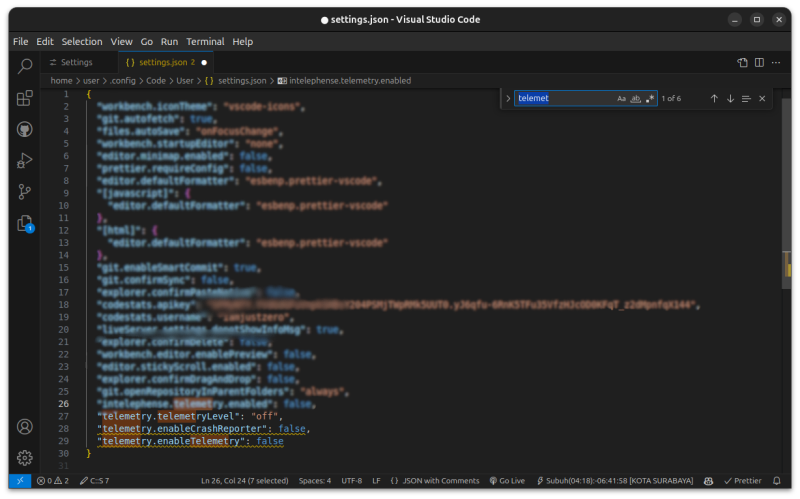
or copy this
  "telemetry.telemetryLevel": "off",
  "telemetry.enableCrashReporter": false,
  "telemetry.enableTelemetry": false
With telemetry turned off, VS Code will collect less data from you. This means fewer details about your usage, errors, and crashes are sent to Microsoft. As a result, your data stays more private.
1 Comments